
| 일 | 월 | 화 | 수 | 목 | 금 | 토 |
|---|---|---|---|---|---|---|
| 1 | 2 | 3 | 4 | 5 | 6 | |
| 7 | 8 | 9 | 10 | 11 | 12 | 13 |
| 14 | 15 | 16 | 17 | 18 | 19 | 20 |
| 21 | 22 | 23 | 24 | 25 | 26 | 27 |
| 28 | 29 | 30 | 31 |
- java list 저장
- java set 저장
- java알고리즘문제풀이
- 격파르타장점
- java알고리즘
- 프로그래머스제일작은수
- 코딩부트캠프후기
- 컴파일
- java map 출력
- 항해15기
- javaJVM
- 노베이스부트캠프
- java map
- 격파르타합격후기
- 비전공자sqld
- 격파르타후기
- sqld자격증합격
- java set 출력
- java 자료구조 활용
- 인터프린터언어
- javaJRE
- 항해99후기
- java기본자료형
- java참조자료형
- 작은수제거하기
- 프로그래머스
- java최솟값구하기
- java map 저장
- 격파르타비전공자
- java list 출력
- Today
- Total
코딩과 결혼합니다
230831 - 알림기능 구현하기(isRead true로 바꾸기 / SSE 연결하기 ) 본문
isRead true로 바꾸기
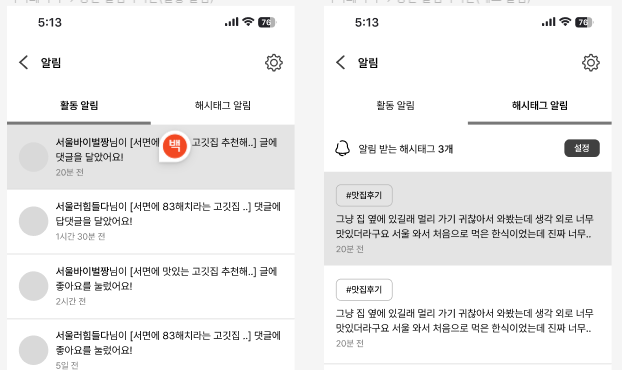
알림 리스트는 push 알림 구독과 상관없이 보여지는 것으로
알림이 발생한 해당 post로 리스트를 클릭해서 들어가지 않으면 읽지 않은것으로 간주하고,
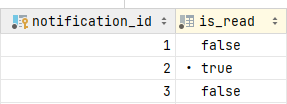
알림 리스트를 클릭하면 알림을 읽은 것으로 보고 isRead를 true로 바꿔주며 다시 false로 바뀔일은 없다!
이 걸 넣은 이유는 사용자가 알림을 읽었는지 안읽었는지 색깔로 다르게 표현하기 위함이었다.
AlarmController

   //알림 눌렀을 때 is read true로
    @PostMapping("/read/{notificationId}")
    public MessageResponseDto markNotificationAsRead(@PathVariable Integer notificationId,
                                                     @AuthenticationPrincipal UserDetailsImpl userDetails){
        User user = userDetails.getUser();
        return alarmService.markNotificationAsRead(notificationId, user);
    }
알림에는 각각 고유한 ID 값이 있다. 그 ID값과 user의 정보를 받는다.
  AlarmService

  // 알림 클릭 후 알림 읽음 처리
    public MessageResponseDto markNotificationAsRead(@PathVariable Integer notificationId, User user) {
        // 알림 조회
        Alarm alarm = alarmRepository.findById(notificationId)
                .orElseThrow(() -> new IllegalArgumentException("해당 알림은 존재하지 않습니다."));

        // 사용자 인증 및 권한 검사
        if (!alarm.getUser().getId().equals(user.getId())) {
            throw new IllegalArgumentException("알림에 대한 액세스 권한이 없습니다.");
        }

        // 알림을 읽음 처리
        alarm.setIsRead(true);
        alarmRepository.save(alarm);

        return new MessageResponseDto("알림을 읽음 처리했습니다.");
    }


    =================================================================

    Alarm(entity) ++추가

    @Column(nullable = false)
    private Boolean isRead;
아주아주 간단하다.
📌 결과
SSE 연결하기
그 누가 쉽다고 했던가. 처음이면 다 어렵다 시간을 얼마나 날려먹었는지 ㅎㅎ
아직 백엔드 쪽에서만 기능을 구현한터라 이게 어떤식으로 알림이 뜰지는 모르겠다.
스프링 프레임워크에 내장되어 있는 SSE를 사용 하였다. 뭐 따로 서버를 만들어서 관리하지는 않고 정말 단순하게 기능을 구현하였다.
SSE를 사용한 이유!
비교적 웹소캣보다 간단하게 기능을 구현할 수 있고, SSE는 HTTP 프로토콜을 기반으로 하며, 서버와 클라이언트 간의 연결을 유지하면서 데이터를 주기적으로 전송하여 웹소캣보다 서버 부하가 적을 수 있다는 판단있었다. 그리고 단방향 통신이 푸시 알림에 적합하다 생각되었다.
@RestController
@RequiredArgsConstructor
public class NotificationController {

    private final NotificationService notificationService;

    @CrossOrigin
    @GetMapping(value = "/notice", consumes = MediaType.ALL_VALUE)
    public SseEmitter subscribe(
            @AuthenticationPrincipal UserDetailsImpl userDetails
    ) {
        return notificationService.addSeeEmitter(userDetails.getUser().getId());
    }
}
/notice 경로로 GET 요청 시 SSEEmitter 객체가 반환되고, 해당 객체는 클라이언트와 연결된 상태에서 알림 데이터 전송 등의 작업을 수행할 수 있는 기능을 제공한다.
- Server-Sent Events (SSE)를 통해 클라이언트에게 알림을 전송하는 엔드포인트를 정의한다.
- @CrossOrigin: 이 어노테이션은 CORS (Cross-Origin Resource Sharing) 정책을 해제하여 다른 도메인에서의 요청도 허용한다는 것을 나타낸다.
@RequiredArgsConstructor
@Service
public class NotificationService {

    public static Map<Long, SseEmitter> sseEmitters = new ConcurrentHashMap<>();

    public void notifyAddEvent(User user, boolean check) {
        Long userId = user.getId();

        if (sseEmitters.containsKey(userId)) {
            if(check){
                SseEmitter sseEmitter = sseEmitters.get(userId);
                try {
                    sseEmitter.send(SseEmitter.event().name("addNotification").data("새로운 알림"));
                } catch (IOException e) {
                    e.printStackTrace();
                }
            }
        }else{
            System.out.println("해당 유저가 연결되어 있지 않습니다.");
        }
    }

    public SseEmitter addSeeEmitter(Long userId){

        SseEmitter sseEmitter = new SseEmitter(Long.MAX_VALUE);

        try {
            // 연결!!
            sseEmitter.send(SseEmitter.event().name("연결되었습니다."));
        } catch (IOException e) {
            e.printStackTrace();
        }

        // user의 pk값을 key값으로 해서 SseEmitter를 저장
        sseEmitters.put(userId, sseEmitter);

        sseEmitter.onCompletion(() -> sseEmitters.remove(userId));
        sseEmitter.onTimeout(() -> sseEmitters.remove(userId));
        sseEmitter.onError((e) -> sseEmitters.remove(userId));
        return sseEmitter;
    }
}
이 서비스 클래스는 클라이언트와 SSE(Server-Sent Events) 방식으로 연결을 관리하며 실시간 알림을 전송하는 기능을 제공한다.
- public static Map<Long, SseEmitter> sseEmitters = new ConcurrentHashMap<>();: 유저 ID를 키로 하고, 해당 유저와 연결된 SseEmitter 객체를 값으로 가지는 맵이다. ConcurrentHashMap은 멀티 스레드 환경에서 안전하게 사용할 수 있는 Map 구현체이다.
- public void notifyAddEvent(User user, boolean check): 새로운 알림 이벤트를 처리하는 메서드이다. 만약 해당 유저가 연결되어 있지 않다면 메시지를 출력하고, 연결되어 있다면 "새로운 알림" 이라는 데이터를 "addNotification"라는 이름의 이벤트로 전송한다.
- public SseEmitter addSeeEmitter(Long userId): 주어진 유저 ID에 대한 SseEmitter 객체를 생성하고 맵에 저장하는 메서드이다.
- 새 SseEmitter 객체가 생성된다. timeout 시간은 최대값(Long.MAX_VALUE)으로 설정되었다.
- 연결이 되면 "연결되었습니다." 라는 데이터를 보낸다.
- 해당 SseEmitter 객체가 완료(Completion), 타임아웃(Timeout), 에러(Error) 상태일 때, 해당 유저 ID와 연관된 SseEmitter 객체를 맵에서 제거한다.
- 마지막으로 생성된 SseEmitter 객체를 반환한다.
SSE를 적용한 코드 일부

 // 댓글 생성
    public CommentResponseDto createComment(Long postId, CommentRequestDto requestDto, User user) {
        Post post = getPostById(postId);
        Comment comment = new Comment(requestDto, user.getNickname(), post, user);
        Comment newComment = commentRepository.save(comment);

        AlarmEventType eventType = AlarmEventType.NEW_COMMENT_ON_POST; // 댓글에 대한 알림 타입 설정
        Boolean isRead = false; // 초기값으로 미읽음 상태 설정
        String notificationMessage = "<b>" + user.getNickname() + "</b>" + "님이 [" + post.getContent() + "] 글에 [" + comment.getComment() + "] 댓글을 달았어요!"; // 알림 메시지 설정
        LocalDateTime registeredAt = LocalDateTime.now(); // 알림 생성 시간 설정
        String userImg = user.getProfileImageUrl();

        if (!post.getUser().getId().equals(user.getId())) {
            Alarm commentNotification = new Alarm(post ,post.getUser(), eventType, isRead, notificationMessage, registeredAt,userImg);
            alarmRepository.save(commentNotification);
            notificationService.notifyAddEvent(post.getUser(), post.getUser().isCommentAlarm());
        }
        return new CommentResponseDto(newComment); // ReCommentResponseDto로 변경
    }
자신의 post에 댓글을 달았다면 알림이 필요 없으니 if (!post.getUser().getId().equals(user.getId())) 로
해당 포스트의 userId 와 댓글을 다는 userId가 같지 않은 것들만 알림을 저장하고 보낸다.
📌 결과
유저와 연결 성공!
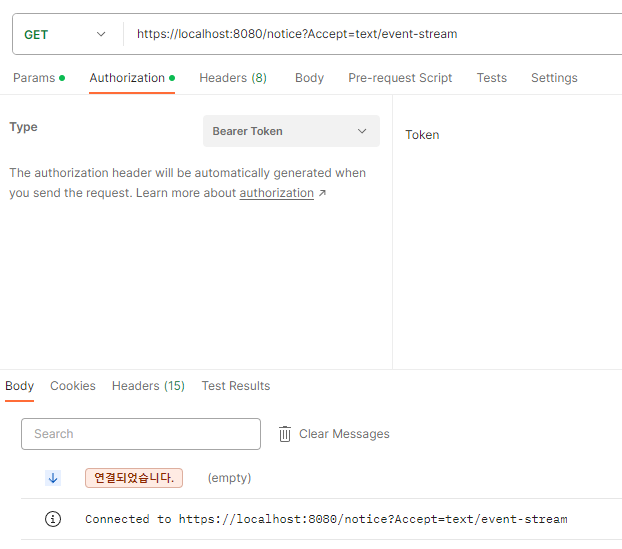
해당 유저는 좋아요, 댓글, 해시태그 구독이 모두 true인 상태이고 다른 유저를 통해서 알림을 발생시켜 보겠다.
다른 유저로 해당유저의 post를 좋아요를 눌렀고 '새로운 알림' 이라고 잘 뜬다!

이번에는 자기가 자기 자신의 post 에 좋아요를 눌렀을 때 알림이 오는지 안 오는지 테스트 해보겠다.
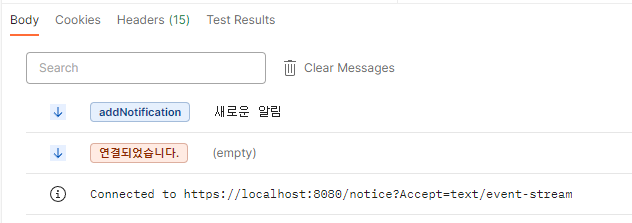
알림이 추가 되지 않고 이전의 알림만 남아있다.
다른 타입의 알림도 정상적으로 잘 온다!
📌 포스트맨으로 SSE 연결 확인하기
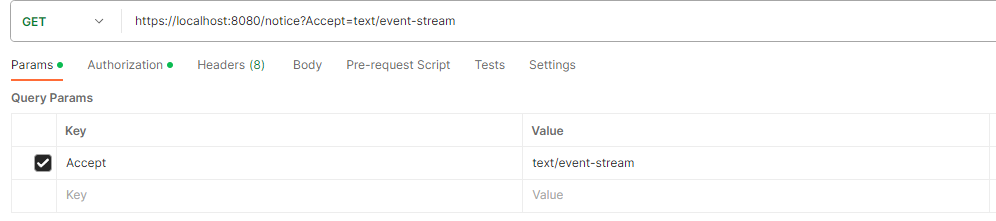
Params에 아래의 내용 추가. 그리고 sse를 연결시킬 유저의 토큰을 Authorization에 넣어준다.
로그인을 하면 내가 직접 토큰을 복사해서 넣어주지 않아도 자동으로 Authorization에 로그인한 유저의 토큰이 들어가는 방법이 있다고 한다. 다음에 한 번 알아봐야겠다.
'코딩과 매일매일♥ > Seoulvival' 카테고리의 다른 글
| 230902 - (코드리팩토링) api 6개를 3개로 합치기!! (0) | 2023.09.02 |
|---|---|
| 230901 - Spring 의 BufferedImage로 S3 이미지 리사이징하기 (0) | 2023.09.01 |
| 230830 - 알림기능 구현하기(해시태그 구독하기/ 알림 구독하기) (0) | 2023.08.31 |
| 230829 - 알림기능 구현하기(알림 리스트) (0) | 2023.08.29 |
| 230828 - 스크랩 기능 (0) | 2023.08.29 |


